Criminal Court Records in Sedgwick County give instant access to felony and misdemeanor case filings, docket numbers, and sentencing orders right from the district clerk’s online portal. By entering a defendant name or case number you can retrieve indictment documents, plea agreements, and pre‑trial hearing notes, while the system flags sealed or restricted files that require in‑person verification at the courthouse. This fast lookup helps attorneys, employers, and families confirm convictions, dismissals, or pending charges without waiting for mailed copies.
Sedgwick County criminal case search also supports detailed filters for filing dates, charge types, and case status, making it simple to track active hearings, probation listings, or closed judgments. Users can request certified court record copies for employment or legal purposes, and the site outlines copy fees, processing times, and how to correct inaccurate entries. Whether you need a criminal docket search or a defendant identity verification, the portal streamlines the entire verification process.
How to Search Criminal Court Records
Criminal Court Records in Sedgwick County let readers review Kansas district court case dockets for felony and misdemeanor charges, filing activity, case status, and sentencing entries. A defendant-name or case-number search helps locate the proper case before you compare its charge, court, and outcome. Users can also check sedgwick county ks for official county government information. The search supports record checks and case-status verification; it does not replace the full court file or a certified copy. Juvenile, sealed, expunged, and other restricted material may not appear in an online result.
Official Search Portal: https://www.dc18.org/records
Steps to Search
- Open the official Sedgwick County District Court records portal and select the criminal case search option.
- Enter the complete case number when available. If you do not have one, search by the defendant’s legal name.
- Review the returned cases and compare the case number, court, filing date, and charge shown in each result.
- Open the matching case to read docket entries for filings, hearings, dispositions, judgments, and sentencing details provided by the portal.
- Use the official records request process for full documents or certified copies, and contact the clerk when a search leaves an unresolved match.
Case Dispositions, Judgments and Sentencing
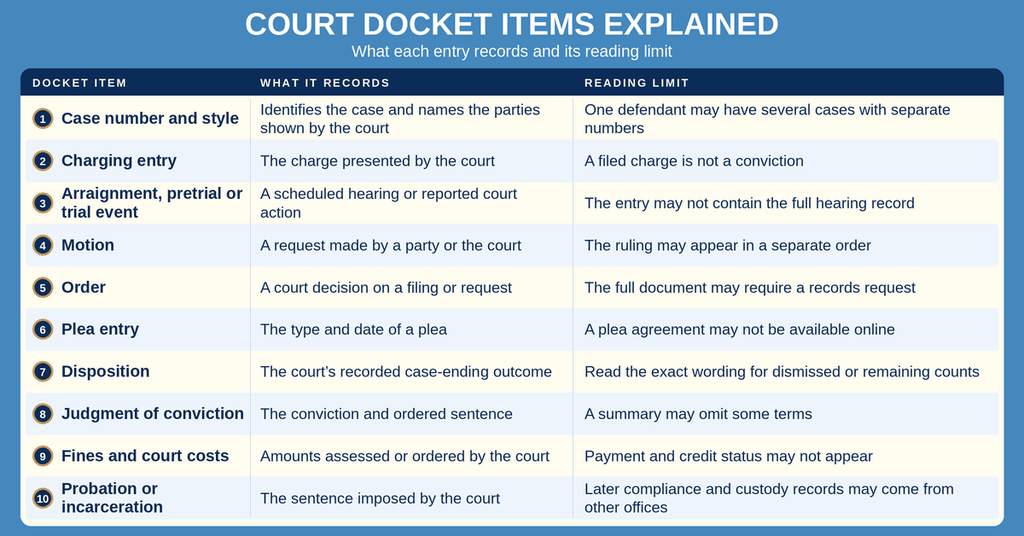
A criminal case can end in several ways, and a docket label may not tell the full story. The party name, case number, and entries surrounding the case-ending event help distinguish a filed charge from a proven charge. A hearing entry may record that a hearing was set without showing the full minutes, order, or outcome.
Case Dispositions: Dismissals, Pleas, Verdicts and Acquittals
A dismissal ends the case without a conviction on the dismissed charges. The file may show a court dismissal, a dismissal by the prosecuting authority, or another disposition recorded by order. The online entry may omit the reason, so the filed order controls when the reason matters.
A guilty plea, no-contest plea, or guilty verdict can lead to a conviction. An acquittal or not-guilty verdict means no conviction on that charge. An amended charging document or partial dismissal can leave other counts active, so read the wording and date of each entry instead of assuming every count ended on the same date.
Judgment Details, Fines and Court Costs
A judgment of conviction records the court’s legal finding and sentence after a conviction. It may identify probation, confinement, restitution, fines, court costs, and other ordered terms. A judgment and sentencing order can appear as separate entries or separate papers, with one entry pointing to the other.
An online docket summary may not show every term in the signed judgment. Fine and court-cost balances can also change through payments or adjustments that are not posted on the criminal docket at once. Anyone who needs the exact judgment, payment status, or complete cost breakdown should request the clerk’s records rather than rely on a search-result summary.
Probation, Incarceration and Sentencing Orders
A probation sentence sets the probation term and court-ordered conditions. The court file does not serve as a full record of probation supervision, compliance, or arrest activity. Later docket entries may address a probation violation, revocation request, or sentence modification.
Incarceration details in a court file show what the court ordered. They do not establish a person’s current custody status. A sentence may involve the Kansas Department of Corrections or county jail confinement, and release or custody updates can come from the agency rather than the court docket. Restitution payment activity and later sentence changes also require careful review of the most recent orders.
Which Sedgwick County Court Holds the Record
A zero-result search often begins with the wrong court. Sedgwick County includes district courts, county courts at law, municipal courts, and juvenile matters handled under separate rules. The Sedgwick County District Court records portal should not be treated as one repository for every court in the county.
District Court and County Court at Law
Kansas district courts have original jurisdiction over felony and misdemeanor criminal cases. County courts at law hear misdemeanor cases and county ordinance violations. A misdemeanor can be filed in either a district court or county court at law, so the case number and court name must match the correct search category.
The charging papers, citation, or case number can identify the filing court. Search that court within the official portal rather than accepting the first similar name. This check prevents a result from another court division from being mistaken for the Sedgwick County case you need.
Municipal Court and Juvenile Matters
Kansas municipal courts handle city ordinance violations and certain traffic matters. Their records are kept by the municipal court rather than the district court clerk. You can also explore court documents through available county records. Juvenile matters follow the juvenile code and separate confidentiality rules. An adult criminal case search cannot replace a juvenile record request, and an online search should not be used to seek juvenile material outside the lawful process.
Obtaining Official Court Documents and Court Files
The docket search answers case-status questions. A records request asks the Clerk of the District Court for documents held in the court file. Before requesting records, decide whether you need a printed docket page, an ordinary copy, a certified copy, or the available filings in the case.
Ordinary Copies and Certified Copies
A certified copy includes the clerk’s certification of the copied record. An ordinary photocopy or portal printout is not certified unless the clerk provides that service. Courts, employers, and other recipients may set their own rules for accepting a record. Ask each recipient whether it needs a certified copy, a recent issue date, the full case caption, a judge’s signature, or a clerk’s seal.
Copy Fees, Delivery and Processing Time
The applicable fee depends on the request. Page count, document type, certification, delivery method, and other court charges can affect the total. Ask the clerk for the current fee, accepted payment method, and required documents before submitting a request. Keep the payment receipt with a copy of the request.
Processing time varies with the type of record and the work required to prepare it. A certified judgment may take longer to produce than a printed docket page. Ask for an expected completion time and whether the clerk offers a status check for the request. Do not rely on a general estimate for a court deadline or filing that must be completed by a certain date.
For an in-person request, bring the case number, exact document title, and payment. Ask what identification or written authorization the clerk requires. If a remote request is permitted, use only the request method published for court records and confirm the destination before sending personal details. Remote delivery, mailing, and electronic options should not be assumed without official confirmation.
Sealed, Restricted and Nonpublic Materials
An electronic docket may not contain every filing. Charging papers, plea agreements, presentence investigation materials, exhibits, and hearing transcripts may require a separate request or may not be open to public inspection. A hearing transcript is often ordered through the court reporter who prepared it rather than through a standard clerk docket request.
A clerk can explain the request process and whether a document exists in the court file. That does not mean the clerk can release sealed or restricted material based on an ordinary request. Juvenile records, sealed files, and restricted documents may require a court order, a qualifying request, or another legal process. A courthouse visit does not remove those restrictions.
Preparing a Precise Court Record Request
A precise request helps staff locate the correct file without confusion. Use identifiers from the docket and describe the paper you need rather than asking for a vague “entire record.” The following details can prevent an incorrect match:
- Provide the defendant’s full legal name as shown in the case, including any middle name or suffix used by the court.
- Give the complete case number and copy every character, including any prefix or suffix that appears on an earlier document.
- Identify the court or division so a similar case from another jurisdiction is not mistaken for the correct file.
- Name the document type, such as judgment of conviction, sentencing order, dismissal order, or certified docket page.
- State the date or date range when the document date matters.
- Specify the requested copy format and delivery method after confirming available choices with the clerk.
- Include current contact details and any request form or signature required by the court.
If two parties have the same name, the clerk may ask for another identifier. Send sensitive personal data only through the official request channel and only to the extent needed to locate the file. Keep a copy of the submitted request, proof of payment, and any receipt so you can document when the request was made.
Record Accuracy and Missing Search Results
A criminal case search can fail or appear wrong for several reasons. Treat the portal as a docket index, then use the strongest identifiers to narrow the result. A missing row does not by itself prove that no case exists, and an online entry does not replace the signed court order.
Defendant Identity and Case Number Checks
Identity checks need more than a common name. A case number is the strongest search key. A name search can produce cases involving several defendants or different people with similar names. These checks help prevent that outcome:
- Search the complete case number when it appears on a citation, charging paper, receipt, or earlier docket page.
- Try the name exactly as recorded, then remove a middle name, middle initial, or suffix if the exact form returns no result.
- Compare the full names in each result rather than accepting a shared surname or middle initial as a match.
- Match the court and case type before opening a result labeled as a criminal case.
- Use the filing date carefully because a docket event date may differ from the date the case was filed.
- Remove narrow date or charge filters when they prevent a match, then narrow the search again after finding the correct case.
- Review each case number as a separate criminal matter because one defendant can have charges arising from different incidents.
- Read the case-status label together with the last docket event, since a status label may not explain every step in the case.
Recently Filed Cases and Update Delays
A newly filed case may not appear as soon as the case number is assigned. Clerks must create and index the docket before the public system can return it, and document images may arrive later. Individuals can also check court calendar online lookup to verify relevant details. A case number from a charging paper can fail to open until indexing is complete. If the filing date is recent, ask the clerk whether the docket has been created and which entries are currently available.
Online entries can also lag signed court documents. A scheduled hearing may appear before the hearing minutes or case-ending order. A closed status may appear before every related document becomes viewable. That gap does not prove a hearing was canceled or that an order was never entered. A clerk can compare the online entry with the court’s source record.
Sedgwick County Cases That Cannot Be Found
A case may be absent because it belongs to a municipal court or juvenile court, was filed under another legal name, has not been indexed, or was affected by a sealing or expungement order. A data-entry problem can also place a case under an incorrect name or identifier. A search failure alone does not prove that no criminal case or conviction exists.
Start a new search with the complete case number. If that fails, remove date and charge filters and try the legal name in a simpler form. Search the matching district or county court category rather than treating both court systems as one result set. If the matter may belong to a municipal or juvenile court, use the proper court process.
Contact the clerk with the name, case number, court, filing date, and the exact result you expected. A focused question lets staff check the source docket. If a visible entry conflicts with a signed order, keep both and ask the clerk to compare them. Some record corrections require a court order rather than a portal edit.
Public Inspection, Sealing and Expungement
Kansas law provides that criminal case files are open to public inspection subject to statutory exceptions. K.S.A. 22-3401 addresses the public inspection of criminal case files. K.S.A. 22-3304 and K.S.A. 21-2511 address court-authorized expungement of records. These laws can affect what a later portal search returns.
Sealing, expungement, and restricted material are separate issues. A case can exist even though its contents cannot be viewed online. An expunged case may no longer produce a normal docket result after the court enters the required order. The clerk can confirm whether an order appears in the file and explain the next legal step when the underlying material remains restricted.
An online status can lag a court order, so the clerk’s file review is more reliable than an outdated search label. A certified copy request also cannot override a sealing or expungement order. Anyone who needs restricted material should ask the clerk or a qualified attorney about the applicable court process rather than treating a public search as permission to obtain it.
Contact Information
Use the following contact details for questions about criminal case searches, court files, certified copies, and record requests.
Frequently Asked Questions
Find quick answers about accessing Criminal Court Records in Sedgwick County, including search tips, docket contents, and how to obtain official copies.
How can I search Sedgwick County criminal court records?
Visit the official Sedgwick County portal at https://www.dc18.org/records. Choose the Criminal Court Records search option. You can enter a defendant name, case number, or charge keyword. The system returns matching docket entries with filing dates, status, and court location. Results are viewable on‑line for free. If you need more detail, note the case number and contact the clerk’s office at (316) 660‑5900 during business hours.
What information appears in a criminal case docket?
A docket lists each filing related to a case. It shows the case number, filing date, type of document such as an indictment, plea agreement, or motion, and the judge assigned. Status updates like arraignment, pretrial hearing, trial, and sentencing are also recorded. The docket gives a timeline of the case but does not include full transcripts or evidence. For a complete view, request the full file from the court clerk.
Can I view sealed or juvenile records online?
Sealed and juvenile records are not available through the public online portal. Those files are restricted by law and require a court order or a specific request from an authorized party. To learn if access is possible, you must contact the Sedgwick County clerk’s office directly. They will explain the required paperwork and any applicable fees.
How do I request a certified copy of a court filing?
Call the clerk’s office at (316) 660‑5900 or visit the courthouse on the 6th floor. Provide the case number and specify the document you need. Fill out a request form and pay the certification fee, which varies by document type. The clerk will process the request and either mail the certified copy or hold it for pickup during normal office hours.
Where can I find sentencing details for a felony case?
Sentencing information appears in the case docket under the “Sentencing Order” entry. Search the case number on the online portal to locate that docket line. It lists the conviction, sentence length, fines, probation terms, and any incarceration order. For official verification, request a certified copy of the sentencing order from the clerk’s office.